
Ted's LightSpace CMS Calibration Disk for PiTPG is now available.
PiTPG (Ted's Edition) features recalculated 10-bit, 1080p and 2160p patterns that deliver smoother gradation than the previous 8-bit, 1080p patterns in Ted’s PGenerator.
It features 162 static or flashing bar patterns (4 versions: 8/10-bit @ 1080p/2160p), HDR step patterns, signal chain check patterns (chroma, pixel, bit-depth), A/V sync tests, video clip playback, custom image and video uploads, apply a LUT at the TPG output, EDID and signal information viewing.
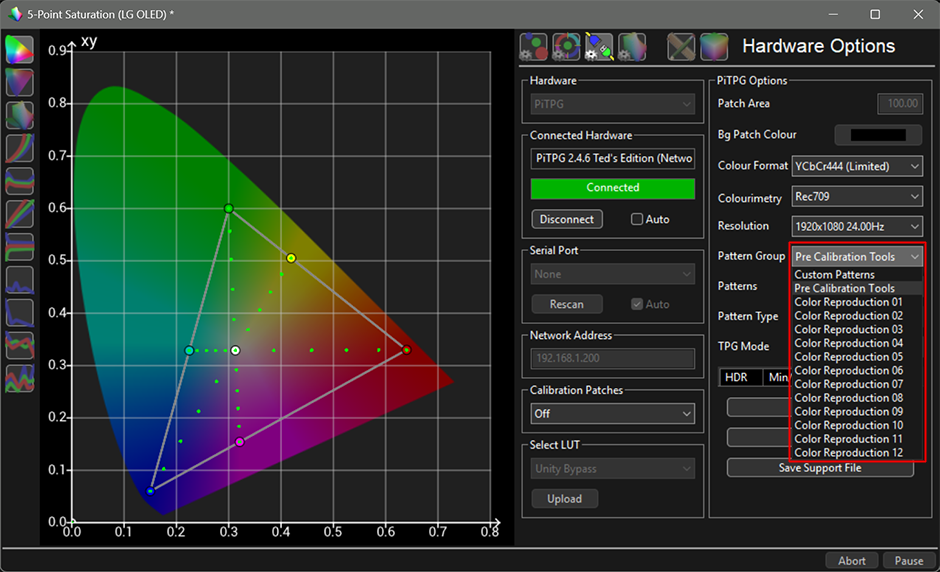
Inject any pattern or configure the settings using ColourSpace or ColourSpace ZRO GUI to measure, profile, or calibrate any HDMI display.
PiTPG (Ted’s Edition) is a modern Raspberry Pi4/Pi5 bit-perfect 8/10-bit HDMI test pattern generator developed by Light Illusion for ColourSpace and ColourSpace ZRO users.
ColourSpace or ColourSpace ZRO has a direct hardware integration with PiTPG (Ted's Edition), so it can generate any required colour patch, either as a managed sequence for automated profiling, or manually selected for manual display calibration adjustment.
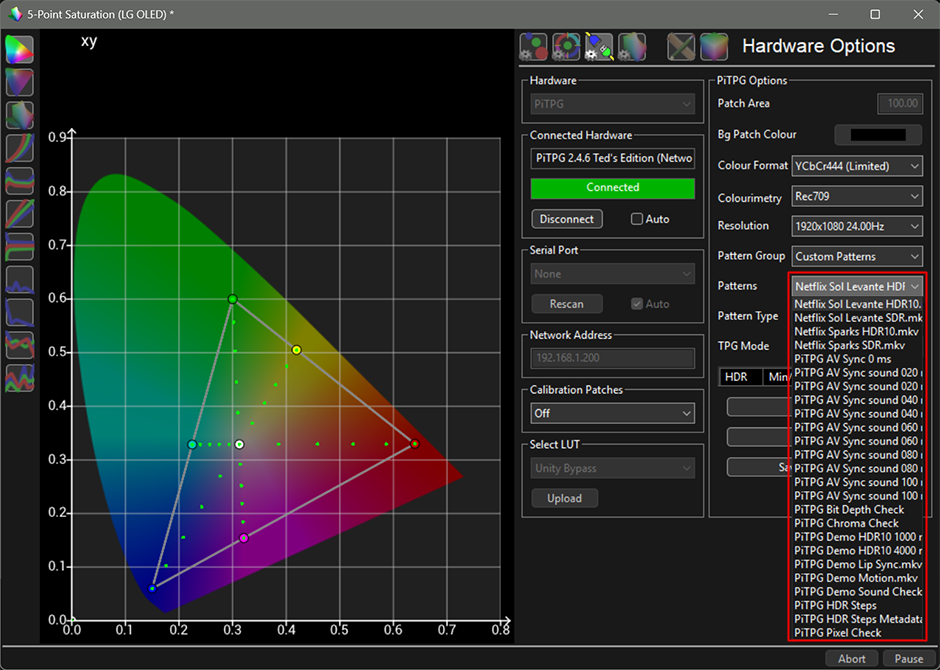
PiTPG (Ted's Edition) includes several additional features: calibration patterns from Ted's LightSpace CMS Calibration Disk, signal chain check patterns, HDR Steps patterns, support for custom images and video clips, an A/V sync test, the ability to apply a LUT at the TPG output, and the PiTPG Info window with support file.

PiTPG (Ted’s Edition) delivers bit-perfect output in all supported formats. It sends the exact 8-bit or 10-bit code values requested by ColourSpace to the HDMI cable in RGB-Full, RGB-Video, YCbCr 4:4:4, or YCbCr 4:2:2. PiTPG performs these calculations internally, rather than relying on the Raspberry Pi's rounding converter.
Raspberry Pi 4 and Pi 5. One SD card image runs on both, using the current 64-bit Raspberry Pi OS.
PiTPG (Ted’s Edition) does not make silent changes. It reads the display's EDID and, if a requested format or bit depth is unsupported, it will not proceed. ColourSpace displays the reason for any refusal, ensuring measurements are only taken in your chosen mode.
PiTPG (Ted’s Edition) fully supports both TV-led and Low-Latency Dolby Vision, and automatically detects which type the display accepts. PGgenetor supports only TV-LED.
Connection is straightforward: use a single USB cable to the ColourSpace PC, Ethernet, or optionally Wi-Fi. ColourSpace connects directly, consistent with other ColourSpace integrated hardware.
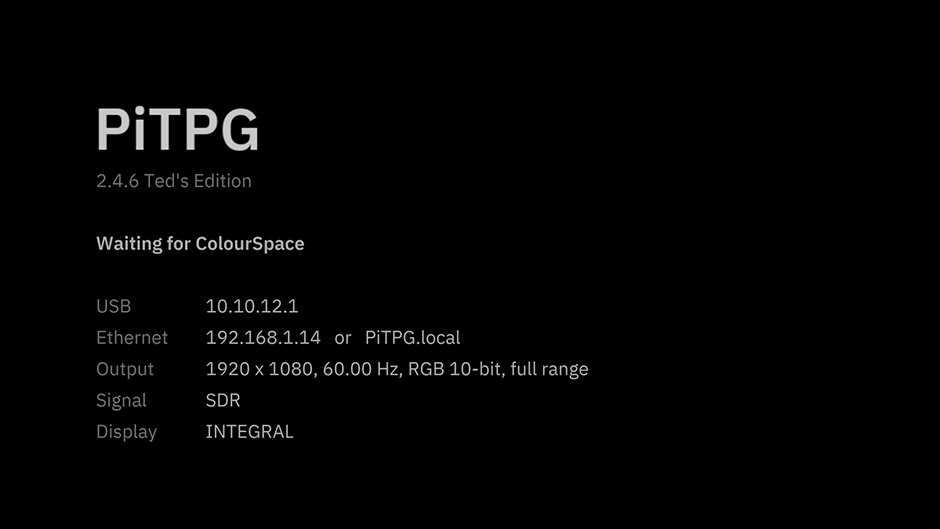
No setup is required on the Pi. No DeviceControl or logins are required. Before the first patch, an information screen displays the necessary addresses for ColourSpace and details about the data being sent.
PiTPG (Ted’s Edition) supports both TV-LED and Low-Latency Dolby Vision and automatically detects the display's compatible format. (PGenerator supports only TV-LED Dolby Vision)
PiTPG (Ted’s Edition) accurately converts Ted's RGB patterns to YCbCr 4:4:4, YCbCr 4:2:2, or generates them as RGB. Previously, PGenerator only supported RGB or YCbCr 4:4:4 conversion.
Correct RGB-Video Output. PiTPG does not have the limitation present in PGenerator, which could not provide bit-perfect output via RGB-Video. As a result, we previously used RGB-FULL as a container and manually adjusted HDMI input levels on the TV or projector.
PiTPG supports RGB output, and the patchscale selection in ColourSpace determines the quantization range. Selecting LEGAL or EXTENDED patchscale sends RGB-Limited AVI, while selecting FULL sends RGB-Full AVI.
Native 4K and 10-bit Ted's Patterns. PiTPG (Ted's Edition) comes in four versions: 8-bit 1080p, 10-bit 1080p, 8-bit 2160p, and 10-bit 2160p. It supports both 8-bit and 10-bit output at 1080p and 2160p resolutions.
The ramps and gradients are recalculated at 10-bit, making them smooth instead of showing 8-bit steps. They are also rebuilt in native 4K resolution, not just enlarged.
The 10-bit patterns and 4K versions provide a clear visual improvement.
In PGenerator, Ted’s Patterns were available in 8-bit 1080p, but the hardware-accelerated upscale to 2160p produced unsatisfactory results.
The PiTPG (Basic) functions solely as a TPG for generating patches and does not include any patterns.

The PiTPG (Ted’s Edition) offers the following additional features:
Chroma Check - ensures full chroma 4:4:4 reaches the display.
Pixel Check - ensures 1:1 pixel mapping.
Bit-Depth Check - confirms whether a display is truly 8-bit, 10-bit, or relies on Frame Rate Control (FRC) dithering.
HDR Steps - This was sent using HDR10 settings in ColourSpace. The upper strip increases evenly in PQ from near-black to the mastering peak defined in ColourSpace (MaxDML). The lower strip displays the top 100 code values up to that peak, with each representing a single 10-bit step.
HDR Steps Metadata Cycle - One frame includes steps up to 10,000 cd/m². PiTPG updates the mastering peak, and MaxCLL is sent to the display every 6 seconds, cycling through 600, 1000, 2000, 4000, and 10,000 cd/m². The heading displays the current values.
Demo Lip Sync - 1080p, 24 fps: features a white flash and a 1 kHz beep occurring simultaneously on the same frame once per second, with frame number and timecode displayed.
Demo Motion - 2160p, 60 fps: includes scrolling text, a moving bar, and a strip that illuminates one box per frame.
Demo HDR10 (1000 and 4000 nits) - 2160p, 24 fps, 10-bit PQ BT.2020 with HDR10 metadata for a 1000 or 4000 cd/m² master: presents grey steps at defined brightness levels from 0.1 cd/m² to the master's peak, BT.2020 colour bars at HDR reference white (203 cd/m², as specified in ITU-R BT.2408), a smooth ramp from black to peak brightness, and a moving highlight at the peak.
Demo Sound Check - 1080p, 24 fps: features tones from the left, right, and both channels, a frequency sweep from 20 Hz to 20 kHz, and pink noise, all with on-screen captions.
Netflix Sol Levante HDR10 and SDR - 45-second excerpt of the animated short (01:12 to 01:57), 2160p, 24 fps, with stereo sound. (From Netflix's HDR10 1000 cd/m² BT.2020 master and its SDR master)
Netflix Sparks HDR10 and SDR - 53-second excerpt of the live-action short (01:36 to 02:29), 2160p, 59.94 fps, with stereo mix.
The HDR10 version is sourced from Netflix's 4000 cd/m² P3 master, mapped precisely within BT.2020 without tone mapping.
(The SDR version is produced by Light Illusion from the same master, using a dedicated HDR-to-SDR conversion LUT as detailed below. Both versions use the central 3840x2160 area of the original 4096x2160 frame.)
(The current PiTPG release (2.4.6) decodes and scales video files using the Pi's video hardware, outputting in RGB-Video. We plan to enable direct HDMI output with YCbCr as soon as possible. For now, please use this function only to view real footage after calibration or for sync and motion tests. For bit-perfect pattern levels, use Ted’s Patterns rather than imported video files.)
PiTPG Info displays detailed information about what PiTPG is sending, including resolution, refresh rate, color format, bit depth, range, and HDR settings (SDR, HDR10, HLG, or Dolby Vision). It also explains output choices, such as why 8-bit is used instead of 10-bit, and shows what the display can accept, including supported color formats, bit depths, HDR and Dolby Vision compatibility, and reported peak and black levels.
Save Support File creates a single text file containing all the above information, along with PiTPG's settings, the display's EDID, and PiTPG's logs. If you encounter any issues, please include this file with your support request.
PiTPG (Basic) is free for ColourSpace INF, XPT, PRO, CAL, LTE, HTX, HTP, HTL, DPS, and Manufacturer Specific PRO/LTE/HTP/HTL users. You can download it from the Customer Download section on the LightIllusion site and get free updates in the future.
ColourSpace ZRO customers do not have access to the Customer Download page. However, they can purchase General Download access for £10 on the LightIllusion site. This provides a single download of the current PiTPG (Basic) version and does not include future updates.
If you have Ted’s PGenerator, you can upgrade to PiTPG (Ted’s Edition) for $10 and get free updates in the future.
Please make sure you have purchased Ted’s PGenerator ISO from the displaycalibrations.com store. This offer is not valid for users of the PGenerator ISO (Public) from AVSForum or the PGenerator from the LightIllusion site, as those only provide the Public ISO, not Ted’s PGenerator ISO.
For ColourSpaceZRO customers, buying PiTPG (Ted’s Edition) is a more affordable option. One purchase gives you free updates in the future.
If you already have Ted's PGenerator ISO with a 'TED' license enhancement, you will retain this enhancement when using PiTPG Ted’s Edition. You do not need to request a new license key enhancement.
The ColourSpace 2.0.0.2481 (5 November 2026) and ColorSpaceZRO 2.0.0.2494 (15 November 2026) updates provide direct PiTPG integration, which replaces the PGenerator hardware option.
You can still use PGenerator through ColourSpace's Network Server and configure the output settings using DeviceControl.
In ColourSpace 2.0.0.2481 (05 November 2026) and ColourSpace ColorSpaceZRO 2.0.0.2494 (15 November 2026), the direct integration of PGenerator via the software GUI for changing output settings or injecting Ted's Patterns was removed.
However, direct integration with PiTPG (Basic) and PiTPG (Ted's Edition) was added, offering more features and new functions.
If needed, you can still use PGenerator through ColourSpace's Network Server and DeviceControl.
Ted's PGenerator has Brightness patterns without numbers or text indicators.
The 'no text' patterns are more efficient with OLED/Projector than the 'text info' versions; however, both options are available.
Advanced Brightness Flashing Bars (Text Info Edition):

Advanced Brightness Flashing Bars (No Text Info Edition):

The small 10x10 pixel box at the top/bottom of the flashing bar works as an indicator for the Reference Black (16).
Full 8/10-bit RGB-triplet pattern generator for SDR, HDR10, HLG, and Dolby Vision using supported hardware and software.
Custom patch sizes, background color, or position of the patch window.
PiTPG works only with ColourSpace 2.0.0.2481 (05 November 2026) and ColourSpace ColorSpaceZRO 2.0.0.2494 (15 November 2026) or newer.
It supports custom patch sizes, custom positioning, and custom background color; a fixed background color or a dynamic background color (linear or code power) that maintains a consistent power average on screen.
Custom background color can help panels with aggressive backlight dimming or active local-dimming functions that can't be disabled during calibration.
Use a gray or white background color to provide more constant backlight dimming during the calibration.
White background with a 50% patch window will provide less panel drift during the calibration of high-brightness on-camera monitors.
Set a custom position of the patch window (top left, bottom right, etc.) for various panel tests; backlight bleeding, uniformity, contrast, etc.
Please refer to the PiTPG LightIllusion manual for complete operational details and set-up instructions.
Pi4 board or Pi5 with ColourSpace or ColourSpaceZRO supports SDR, HDR10, HLG and Dolby Vision* with 8-bit/10-bit RGB or YCbCr 4:4:4/4:2:2 (REC.709 or REC.2020) 2160p output. (* Dolby Vision HDMI Tunneling uses 8-bit RGB as a container.)
Dolby Vision TPG works with compatible TV-LED displays, like the LG OLEDs. You can disable the DV processing to calibrate the panel and re-enable it to verify the calibration.
LG OLEDs iTPG can't verify the DV calibration.
CalMAN Home for LG customers can use ColourSpace or ColourSpaceZRO to verify their DV AutoCAL calibration since the LGs iTPG can't verify the DV calibration.
Using our dedicated guide, you can perform a full LG OLED Dolby Vision calibration with ColourSpace or ColourSpaceZRO.
In addition, we have included a macro-enabled excel to auto-generate the Dolby Configuration file for your LG TV model (2017-2026).
Dolby's HDMI Tunnelling will require a TV-LED Dolby Vision HDMI-capable TV model.
We have tested the LG OLEDs 2017-2026, and DV TPG is working.
Starting from 2021, Sony OLED TVs support TV-LED Dolby Vision.
It may work with other TV-LED DV capable TV models; Panasonic, Philips, or Sharp TVs.
It will work with TCL TV-LED DV capable TV models.
We can add a list with the supported TV models when we will have enough feedback from users of other TV-LED Dolby Vision capable TVs.
ColourSpace or ColourSpaceZRO customers of PiTPG can use 10-bit patchlists (input) and generate accurate 10-bit patches (output).
CalMAN or HCFR supports only 8-bit patchlists.
Murideo SEVEN 8K (7.2K$) supports 10-bit input/output, like the PiTPG with a Pi4 or Pi5 board.
Murideo SiX G GEN1/GEN 2 (2.5K$), Six-G GEN 8K (3K$), or VideoForge PRO 8K (1.65K$) are not supporting 10-bit (input).
However, they can provide 10-bit output using a conversion matrix (8-bit -> 10-bit), so they are not 'real' 10-bit TPGs.
You can see below the differences in grayscale patch generation, for example, in TV legal range (16-235):
An 8-bit input generator with 8-bit output can generate 220 steps of grayscale.
An 8-bit input generator with 10-bit output can generate 220 steps of grayscale.
An 8-bit input generator with 12-bit output can generate 220 steps of grayscale.
A 10-bit input generator with 10-bit output can generate 880 steps of grayscale.
PiTPG (Ted's Edition) with a Pi4 or Pi5 board can generate bit-perfect 8-bit or 10-bit REC.709/REC.2020 with YCbCr 4:2:2, YCbCr 4:4:4, or RGB and eliminate the colorspace conversion rounding errors, a typical issue of 8-bit reference pattern generators.
The SMTPE ST.2048 (PQ-EOTF) has 10-bit digital code values (64-940) absolute luminance targets in TV Legal range.
When you have a TPG with 10-bit (input/output) capability, you can generate more accurate patterns for HDR10 to calibrate or verify a TV, Projector, or Monitor calibration.
For 1D/3D LUT HDR profiling of professional post-production monitors, you can use ColourSpace's 'Limit Range' with increased accurancy to define the 'exact' clipping range or other ColourSpace's Tone Mapping options.
For SDR 3D LUT profilings of LG OLEDs, the 10-bit patchlists will also increase the accuracy and slightly improve the post-calibration verification dE average.
For the manual calibration of consumer TVs, we have found that Sony and LG OLED TVs' SoC is mapping the normal TV RGB balance controls to 10, 20, or 22-Point Grayscale 10-bit code values.
Using a 10-bit patchlist with the same 10-bit code levels as the TVs SoC needs for each RGB balance control will improve the calibration and reduce the chances of potential errors due to mismatch of the generated patches compared to the adjustment range of the internal TV controls.
We have published the LG OLEDs 2018/2019/2020/2021/2022 HDR10 (8-bit / 10-bit) Patchlists (LEGAL/FULL) for ColourSpace/ColourSpaceZRO.
They are also available 10-bit patchlists for Sony TVs.
Sony is recommending patch generators with YCbCr 10-bit colorspace output.
However, CalMAN can't generate 'real' 10-bit patches, and the 8-bit generated patches are not accurately mapping the 10-bit TV controls.
PiTPG (Ted's Edition) customers have access to 8/10-bit patchlists to perform the following measurements:

The saturation patchsets are different from those included in ColourSpace. (ZRO does not include any patchlist)
ColourSpace uses equal-spaced RGB for saturation steps.
The equal-spaced RGB values will not map as equal-spaced points in a CIE chromaticity diagram.
Ted's saturation patchsets use trigonometry to calculate the RGB targets, like CalMAN, so the calibration targets between ColourSpace and CalMAN will match in the CIE chromaticity diagram.
Ted's RGB triplets match CalMAN's RGB triplets on those patchlists.
You can use them to compare different meter settings between ColourSpace and CalMAN.
You can evaluate the measuring speed or the repeatability in low-luminance levels.
PiTPG with Pi4 or Pi5 boards and ColourSpace/ColourSpaceZRO provides 'real' 10-bit (SDR/HDR10/HLG) and Dolby Vision patch generation.
These TPG options were previously available only to expensive license levels and hardware TPGs.
You can purchase PiTPG (Ted's Edition) as a bundle with ColourSpaceZRO for -5$ less.

This website uses a Comodo Positive SSL certificate to protect online transactions with the highest strength encryption.